Lower your internet bill
61% of people overpay for their internet.
Are you one of them?
Unlock exclusive offers in your area!
Call now
[tel]Enter zip code
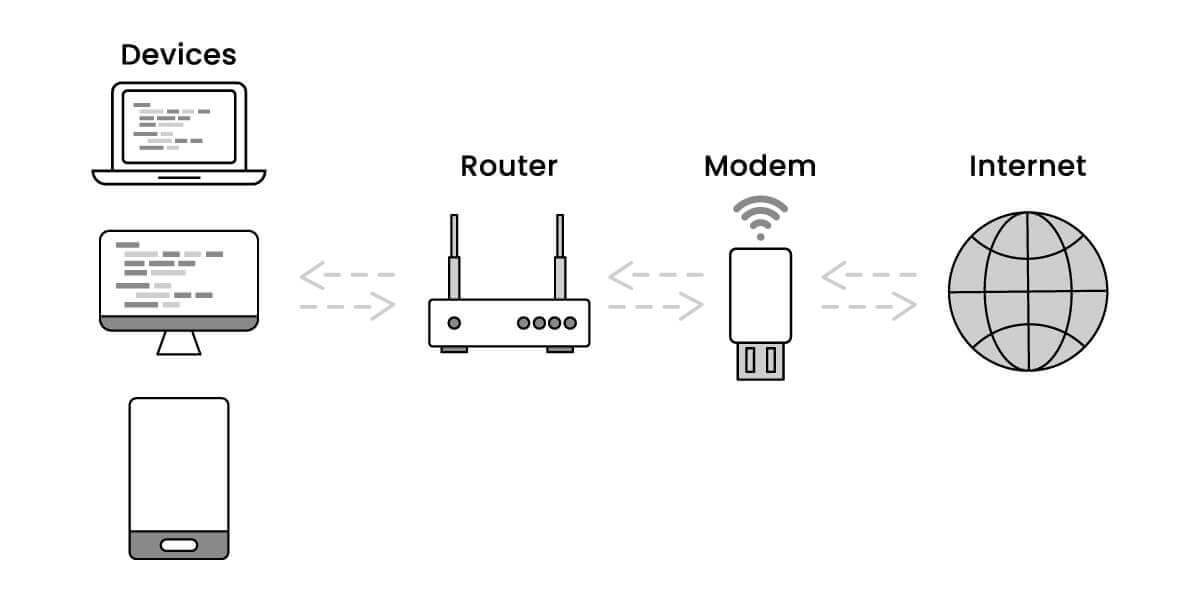
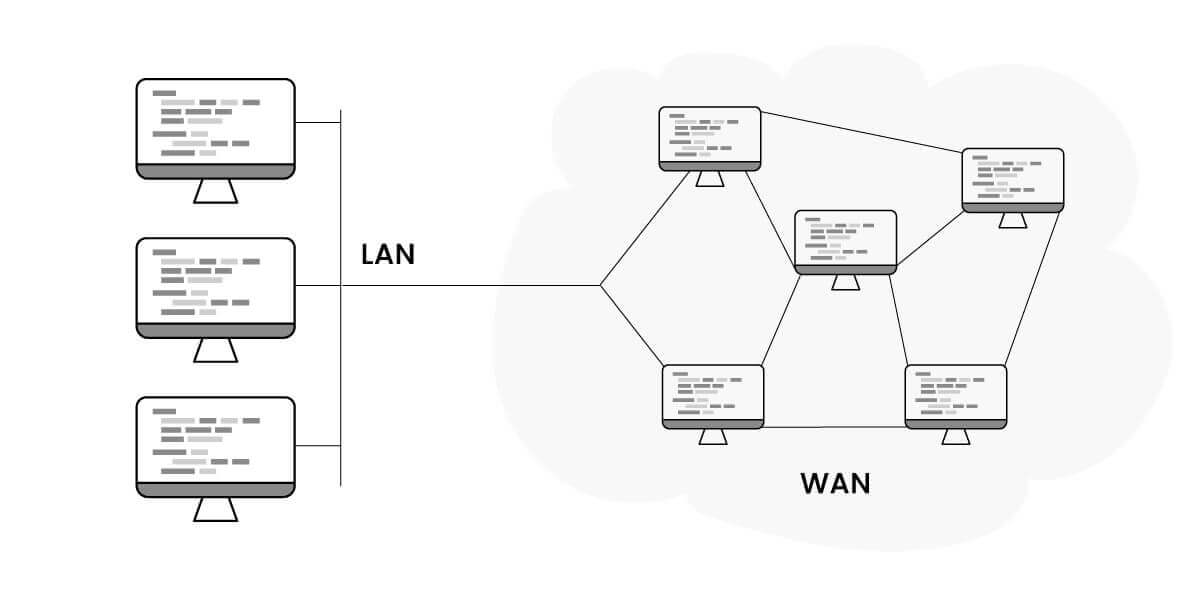
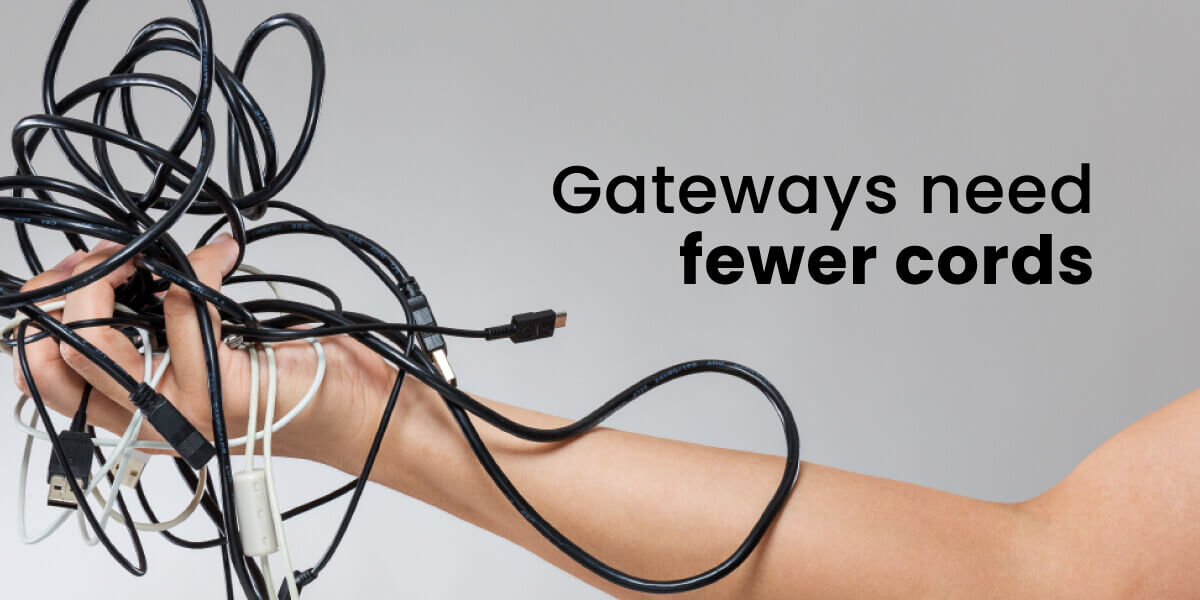
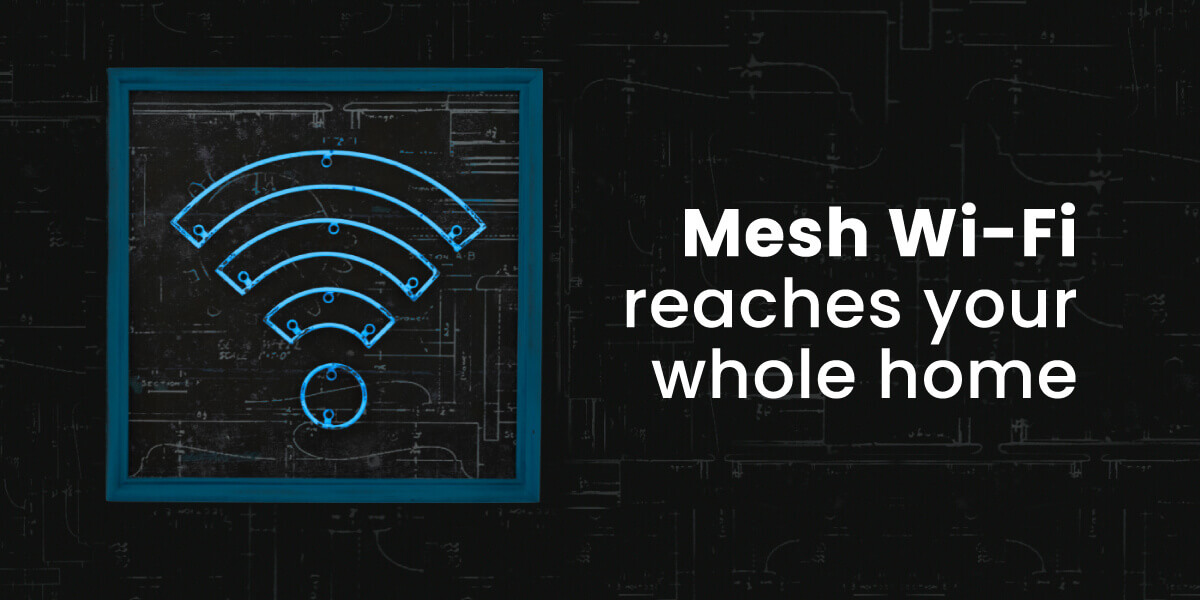
{ "@context": "https://schema.org", "@graph": [ { "@type": "Organization", "@id": "https://compareinternet.com/#organization", "name": "Blog", "logo": { "@type": "ImageObject", "@id": "https://compareinternet.com/#logo", "url": "https://content.isg.us/wp-content/uploads/2023/03/compare-internet-logo-compress.svg", "contentUrl": "https://content.isg.us/wp-content/uploads/2023/03/compare-internet-logo-compress.svg", "caption": "Blog", "inLanguage": "en-US", "width": "144", "height": "63" } }, { "@type": "WebSite", "@id": "https://compareinternet.com/#website", "url": "https://compareinternet.com/", "name": "https://compareinternet.com/", "publisher": { "@id": "https://compareinternet.com/#organization" }, "inLanguage": "en-US" }, { "@type": "ImageObject", "@id": "https://content.isg.us/wp-content/uploads/2023/07/1689334_BlogGraphics-DoINeedaModemandRouter_01_072623-1.jpg", "url": "https://content.isg.us/wp-content/uploads/2023/07/1689334_BlogGraphics-DoINeedaModemandRouter_01_072623-1.jpg", "width": "1200", "height": "750", "caption": "", "inLanguage": "en-US" }, { "@type": "BreadcrumbList", "@id": "https://compareinternet.com/blog/need-a-modem-and-router/#breadcrumb", "itemListElement": [ { "@type": "ListItem", "position": "1", "item": { "@id": "https://compareinternet.com/", "name": "Home" } }, { "@type": "ListItem", "position": "2", "item": { "@id": "https://compareinternet.com/blog/", "name": "Blog" } }, { "@type": "ListItem", "position": "3", "item": { "@id": "https://compareinternet.com/blog/need-a-modem-and-router/", "name": "Do I Need a Modem and Router?" } } ] }, { "@type": "WebPage", "@id": "https://compareinternet.com/blog/need-a-modem-and-router/#webpage", "url": "https://compareinternet.com/blog/need-a-modem-and-router/", "name": "DISH vs Cable | Infinity DISH", "datePublished": "2023-07-27T16:18:20+00:00", "dateModified": "2024-03-18T13:34:21+00:00", "isPartOf": { "@id": "https://compareinternet.com//#website" }, "primaryImageOfPage": { "@id": "https://content.isg.us/wp-content/uploads/2023/07/1689334_BlogGraphics-DoINeedaModemandRouter_01_072623-1.jpg" }, "inLanguage": "en-US", "breadcrumb": { "@id": "https://compareinternet.com/blog/need-a-modem-and-router/#breadcrumb" } }, { "@type": "Person", "@id": "https://compareinternet.com/rosslyn-elliott/", "name": "Rosslyn Elliott", "url": "https://compareinternet.com/rosslyn-elliott/", "image": { "@type": "ImageObject", "@id": "https://content.isg.us/wp-content/uploads/2023/02/Roz-Elliot.jpeg", "url": "https://content.isg.us/wp-content/uploads/2023/02/Roz-Elliot.jpeg", "caption": "Rosslyn Elliott", "inLanguage": "en-US" }, "worksFor": { "@id": "https://compareinternet.com/" } }, { "@type": "BlogPosting", "headline": "Do I Need a Modem and Router?", "keywords": "need a modem and router", "datePublished": "2023-07-27T16:18:20+00:00", "dateModified": "2024-03-18T13:34:21+00:00", "articleSection": "Blog", "author": { "@id": "https://compareinternet.com/rosslyn-elliott/", "name": "Rosslyn Elliott", "url": "https://compareinternet.com/rosslyn-elliott/" }, "publisher": { "@id": "https://compareinternet.com/#organization" }, "description": "Not sure if you need a modem and router or just one device? Get to know the key differences between your modem and router with our easy guide.", "name": "Do I Need a Modem and Router?", "@id": "https://compareinternet.com/#richSnippet", "isPartOf": { "@id": "https://compareinternet.com/#webpage" }, "image": { "@id": "https://content.isg.us/wp-content/uploads/2023/07/1689334_BlogGraphics-DoINeedaModemandRouter_01_072623-1.jpg" }, "inLanguage": "en-US", "mainEntityOfPage": { "@id": "https://compareinternet.com/#webpage" } }, { "@context": "https://schema.org", "@type": "NewsArticle", "articleBody": "<p>Do you know the difference between a modem and a router? If you do, great! But if you’re a little fuzzy, or you can’t tell them apart in a mess of cords, no need to worry. We are here to help!</p><p>While a modem and router may seem the same, they each play a different role in connecting your devices to the internet. Read on to learn more about why you need a modem and router to bring the web to your home.<!--more--></p><h2><strong>What is a Modem?</strong></h2><p>A modem is the device that connects your home to the internet service coming from your provider. It converts the signal from your internet service provider (ISP) into a type of connection your devices can understand, usually an ethernet cable or Wi-Fi.</p><p>Some common types of modems are:</p><ul><li>Cable Modem – Connects to cable internet like Xfinity or Spectrum</li><li>DSL Modem – Connects to <a href="https://www.compareinternet.com/blog/dsl-vs-fiber-internet/" target="_blank" rel="noopener noreferrer">DSL internet</a> from internet service providers</li><li>Fiber ONT – Converts fiber optic signals to ethernet or Wi-Fi</li></ul><h2><strong>What is a Router?</strong></h2><p>A router takes the signal from your modem and broadcasts a <a href="https://www.compareinternet.com/blog/a-brief-history-of-wifi/" target="_blank" rel="noopener noreferrer">Wi-Fi network</a> throughout your home so all your devices can access the internet. It also assigns IP addresses to differentiate each device on your home network.</p><p>Routers come in a few types:</p><ul><li>Wired Router – Connects devices via ethernet cables</li><li>Wireless Router – Broadcasts Wi-Fi signal</li><li>Dual-Band Router – Older, broadcasts<a href="https://www.compareinternet.com/blog/2-4-ghz-vs-5-ghz-wifi/" target="_blank" rel="noopener noreferrer"> 2.4 GHz and 5 GHz</a></li><li>Tri-Band Router – Newest, broadcasts 2.4 GHz, 5 GHz, and 60 GHz for fast speeds</li></ul><p><img decoding="async" loading="lazy" class="alignnone size-full wp-image-1697" src="https://content.isg.us/wp-content/uploads/2023/07/1689334_BlogGraphics-DoINeedaModemandRouter_02_072623.jpg" alt="diagram of how modem and router work" width="1200" height="600" srcset="https://content.isg.us/wp-content/uploads/2023/07/1689334_BlogGraphics-DoINeedaModemandRouter_02_072623.jpg 1200w, https://content.isg.us/wp-content/uploads/2023/07/1689334_BlogGraphics-DoINeedaModemandRouter_02_072623-300x150.jpg 300w, https://content.isg.us/wp-content/uploads/2023/07/1689334_BlogGraphics-DoINeedaModemandRouter_02_072623-1024x512.jpg 1024w, https://content.isg.us/wp-content/uploads/2023/07/1689334_BlogGraphics-DoINeedaModemandRouter_02_072623-768x384.jpg 768w" sizes="(max-width: 1200px) 100vw, 1200px" /></p><h3><strong>What are LAN and WAN on my Router?</strong></h3><p>The router interacts with two types of networks – a <a href="https://www.geeksforgeeks.org/difference-between-lan-and-wan/" target="_blank" rel="noopener noreferrer">LAN (local area network)</a> and a WAN (wide area network).</p><p>The LAN refers to the network inside your home that connects all your devices and allows them to communicate with each other.</p><p>The WAN is your connection to the internet (the wider network) provided by your ISP. The modem connects your home’s LAN to the WAN of the internet.</p><ul><li>The modem brings in the internet signal from the ISP over the WAN (wide area network).</li><li>The modem converts that signal into a wired Ethernet connection.</li><li>The router has a WAN port specifically for connecting to the modem and receiving this internet connection.</li><li>The router uses the connection from its WAN port to establish the LAN (local area network) and WiFi for your home.</li></ul><p>So, the WAN port on the router is the input where it connects to the modem to access the internet. The router takes the WAN connection from the modem and shares it through the LAN ports and Wi-Fi.</p><p><img decoding="async" loading="lazy" class="alignnone size-full wp-image-1715" src="https://content.isg.us/wp-content/uploads/2023/07/1689334_BlogGraphics-DoINeedaModemandRouter_03_072623.jpg" alt="Diagram of WAN wide area network and LAN local area network" width="1200" height="600" srcset="https://content.isg.us/wp-content/uploads/2023/07/1689334_BlogGraphics-DoINeedaModemandRouter_03_072623.jpg 1200w, https://content.isg.us/wp-content/uploads/2023/07/1689334_BlogGraphics-DoINeedaModemandRouter_03_072623-300x150.jpg 300w, https://content.isg.us/wp-content/uploads/2023/07/1689334_BlogGraphics-DoINeedaModemandRouter_03_072623-1024x512.jpg 1024w, https://content.isg.us/wp-content/uploads/2023/07/1689334_BlogGraphics-DoINeedaModemandRouter_03_072623-768x384.jpg 768w" sizes="(max-width: 1200px) 100vw, 1200px" /></p><h2><strong>Differences Between a Modem and Router</strong></h2><p>Here are three basic difference between a modem and a router:</p><ul><li>Modem connects to ISP, router connects devices to Wi-Fi</li><li>Modem converts ISP signal, <a href="https://www.compareinternet.com/blog/ways-to-extend-your-wi-fi-signal/" target="_blank" rel="noopener noreferrer">router broadcasts Wi-Fi</a></li><li>Modem has 1 IP address, router assigns multiple IP addresses</li></ul><h2><strong>Do I Need Both a Modem and Router?</strong></h2><p>Yes, you need both a <a href="https://www.compareinternet.com/blog/best-routers-and-modems/" target="_blank" rel="noopener noreferrer">modem and a router</a> in order to access the internet in your home. Here’s why:</p><ul><li>The modem connects to your ISP and brings the internet to your home.</li><li>The router takes the internet connection from the modem and makes it wireless so your devices can access it.</li></ul><p>You need the modem to establish the initial internet connection. The router takes that connection and makes it available wirelessly to laptops, phones, and more.</p><p><img decoding="async" loading="lazy" class="alignnone size-full wp-image-1716" src="https://content.isg.us/wp-content/uploads/2023/07/1689334_BlogGraphics-DoINeedaModemandRouter_04_072623.jpg" alt="Gateways or modem/router combos need fewer cords with image of hand clutching tangled cords" width="1200" height="600" srcset="https://content.isg.us/wp-content/uploads/2023/07/1689334_BlogGraphics-DoINeedaModemandRouter_04_072623.jpg 1200w, https://content.isg.us/wp-content/uploads/2023/07/1689334_BlogGraphics-DoINeedaModemandRouter_04_072623-300x150.jpg 300w, https://content.isg.us/wp-content/uploads/2023/07/1689334_BlogGraphics-DoINeedaModemandRouter_04_072623-1024x512.jpg 1024w, https://content.isg.us/wp-content/uploads/2023/07/1689334_BlogGraphics-DoINeedaModemandRouter_04_072623-768x384.jpg 768w" sizes="(max-width: 1200px) 100vw, 1200px" /></p><h2><strong>Can I Use a Modem/Router Combo?</strong></h2><p>Many internet providers now offer a modem/router combo unit. This combines the modem and router into a single device often called a gateway.</p><p>A <a href="https://www.compareinternet.com/blog/best-modem-router-combos/" target="_blank" rel="noopener noreferrer">modem/router combo</a> works the same way as separate devices. The modem functionality connects to the ISP, while the router broadcasts Wi-Fi.</p><p>The main benefit of a combo unit is simplicity – just one box and set of wires instead of two separate devices. A potential downside is if one part stops working, you may need to replace the whole unit.</p><h2><strong>Getting Your Best Modem Router Setup</strong></h2><p>To get the fastest speeds and best Wi-Fi coverage, you may want to use a separate modem and router instead of a combo unit. Some tips:</p><ul><li>Get a <a href="https://en.wikipedia.org/wiki/DOCSIS" target="_blank" rel="noopener noreferrer">DOCSIS 3.1</a> modem for fast cable internet speeds</li><li>Use a wireless router with the latest Wi-Fi 6 standard</li><li>Make sure your modem and router are compatible with your ISP</li><li>Move the router to a central location for optimal Wi-Fi range</li><li>Set up a mesh Wi-Fi system for whole home coverage</li><li>Update your modem and router firmware for new features</li><li>Change your router settings like Wi-Fi channel, <a href="https://www.compareinternet.com/blog/understanding-internet-security-and-online-privacy/" target="_blank" rel="noopener noreferrer">security protocols</a>, and more as needed</li></ul><p> </p><p><img decoding="async" loading="lazy" class="alignnone size-full wp-image-1717" src="https://content.isg.us/wp-content/uploads/2023/07/1689334_BlogGraphics-DoINeedaModemandRouter_05_072623.jpg" alt="Mesh Wi-Fi covers your whole home with strong Wi-Fi signal with image of home blueprint" width="1200" height="600" srcset="https://content.isg.us/wp-content/uploads/2023/07/1689334_BlogGraphics-DoINeedaModemandRouter_05_072623.jpg 1200w, https://content.isg.us/wp-content/uploads/2023/07/1689334_BlogGraphics-DoINeedaModemandRouter_05_072623-300x150.jpg 300w, https://content.isg.us/wp-content/uploads/2023/07/1689334_BlogGraphics-DoINeedaModemandRouter_05_072623-1024x512.jpg 1024w, https://content.isg.us/wp-content/uploads/2023/07/1689334_BlogGraphics-DoINeedaModemandRouter_05_072623-768x384.jpg 768w" sizes="(max-width: 1200px) 100vw, 1200px" /></p><h2><strong>Modem Router Troubleshooting</strong></h2><p>If you’re having issues with slow internet or Wi-Fi dropout, there are some basic troubleshooting steps to try with your modem and router:</p><ul><li>Reset your <a href="https://www.compareinternet.com/blog/best-routers-and-modems/" target="_blank" rel="noopener noreferrer">modem and router</a> by unplugging them for 30 seconds</li><li>Make sure all connections are secure and lights are indicating proper operation</li><li>Log in to your router admin page and verify settings are correct</li><li>Check for firmware updates for your modem and router</li><li>Contact your ISP if you still have modem connection issues</li><li>If needed, replace very old modems or routers that can’t keep up with faster internet</li></ul><h2>When Do I Need To Upgrade My Modem and Router?</h2><p>As internet speeds get faster, at some point you may need to upgrade your modem and router. Here are signs it’s time for an upgrade:</p><ul><li>Your internet plan speed has increased but your devices aren’t achieving those faster speeds</li><li>You consistently experience buffering or lag when streaming or <a href="https://www.compareinternet.com/blog/what-is-the-best-internet-provider-for-gaming-in-my-area/" target="_blank" rel="noopener noreferrer">gaming</a></li><li>Your <a href="https://www.compareinternet.com/blog/slow-internet-at-night-and-how-to-fix-it/" target="_blank" rel="noopener noreferrer">Wi-Fi is slow</a> or keeps dropping, even close to the router</li><li>Your modem or router is over 5 years old</li><li>Your provider says your equipment is not compatible with new plans</li></ul><p>Upgrading to a DOCSIS 3.1 modem and Wi-Fi 6 router can provide faster speeds and better performance when your old equipment can’t keep up anymore.</p><p><img decoding="async" loading="lazy" class="alignnone size-full wp-image-1718" src="https://content.isg.us/wp-content/uploads/2023/07/1689334_BlogGraphics-DoINeedaModemandRouter_06_072623.jpg" alt="Check your router lights for troubleshooting with image of lights and labels such as internet and ethernet" width="1200" height="450" srcset="https://content.isg.us/wp-content/uploads/2023/07/1689334_BlogGraphics-DoINeedaModemandRouter_06_072623.jpg 1200w, https://content.isg.us/wp-content/uploads/2023/07/1689334_BlogGraphics-DoINeedaModemandRouter_06_072623-300x113.jpg 300w, https://content.isg.us/wp-content/uploads/2023/07/1689334_BlogGraphics-DoINeedaModemandRouter_06_072623-1024x384.jpg 1024w, https://content.isg.us/wp-content/uploads/2023/07/1689334_BlogGraphics-DoINeedaModemandRouter_06_072623-768x288.jpg 768w" sizes="(max-width: 1200px) 100vw, 1200px" /></p><h2>FAQs: Do You Need a Modem and Router?</h2><h3>Do I need both a modem and router?</h3><p>Yes, you need both because they serve different functions. The modem connects to your ISP, the router broadcasts Wi-Fi.</p><h3>How do I change router settings?</h3><p>Log in to your router admin page on your computer’s browser. The login info is usually on a sticker on your router. From there you can alter <a href="https://www.compareinternet.com/blog/how-to-change-your-wifi-password/" target="_blank" rel="noopener noreferrer">Wi-Fi name, password</a>, channels and more.</p><h3>What’s the difference between a modem and router?</h3><p>The modem connects your home directly to the internet service. The router takes the internet connection and makes it wireless so devices can access it.</p><h3>Which modem should I use?</h3><p>For fast internet get a DOCSIS 3.1 cable modem or a fiber optic modem. Make sure it’s compatible with your internet service provider.</p><h3>How do I set up a modem and router?</h3><p>First connect the modem to your ISP’s incoming line. Then connect the router to the modem’s ethernet port. Refer to setup guides for exact steps.</p><h3>What do modem/router lights mean?</h3><p>Consult your device guides, but usually steady lights indicate proper connections. Blinking means the device is still setting up. No lights means it’s not getting power.</p>", "headline": "Do I Need a Modem and Router?", "articleSection": "Wi-Fi", "datePublished": "2023-07-27T16:18:20+00:00", "dateModified": "2024-03-18T13:34:21+00:00", "publisher": [{ "@type": "Organization", "name": "Compare Internet", "logo": { "@type": "ImageObject", "url": "https://www.compareinternet.com/wp-content/uploads/2023/02/Compare-Internet-white.png", "width": 1350, "height": 360 }, "alternateName": "Compare Internet" }], "author": [{ "@type": "Person", "name": "Rosslyn Elliott", "url": "https://compareinternet.com/authors/rosslyn-elliott/", "jobTitle": "Rosslyn Elliott", "image": { "@type": "ImageObject", "url": "https://content.isg.us/wp-content/uploads/2023/02/Roz-Elliot.jpeg", "height": 337, "width": 337 } }], "image": [{ "@type": "ImageObject", "url": "https://content.isg.us/wp-content/uploads/2023/07/1689334_BlogGraphics-DoINeedaModemandRouter_01_072623-1.jpg", "height": 1200, "width": 750 }], "description": "Do I Need a Modem and Router?", "wordCount": "1956", "mainEntityOfPage": "https://compareinternet.com/blog/need-a-modem-and-router/" } ] }