Lower your internet bill
61% of people overpay for their internet.
Are you one of them?
Unlock exclusive offers in your area!
Call now
[tel]Enter zip code

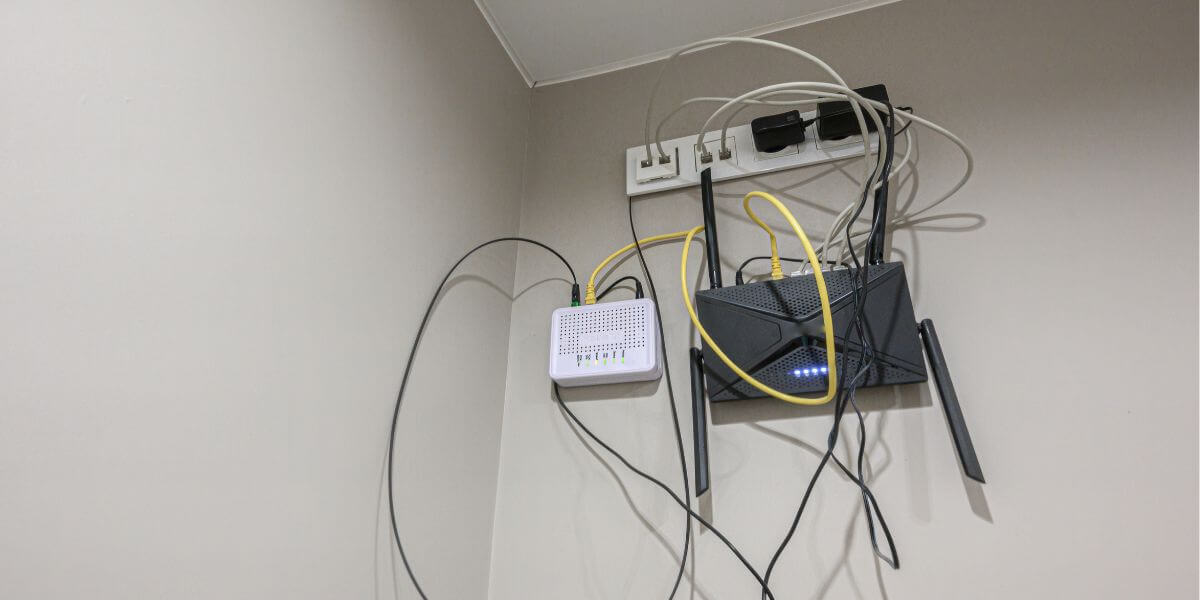
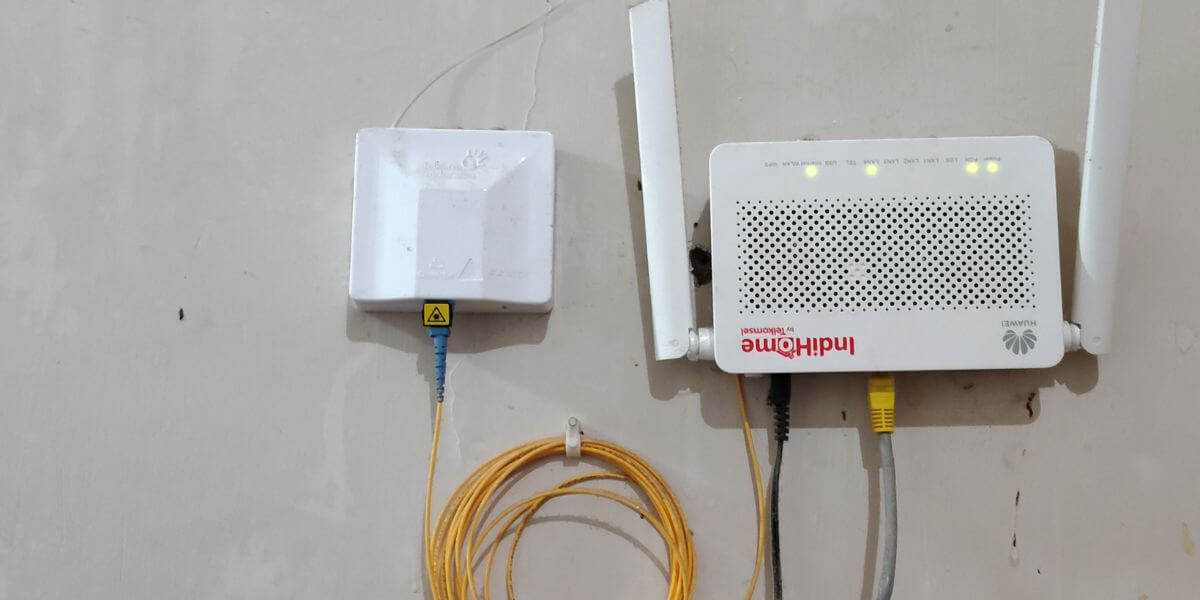
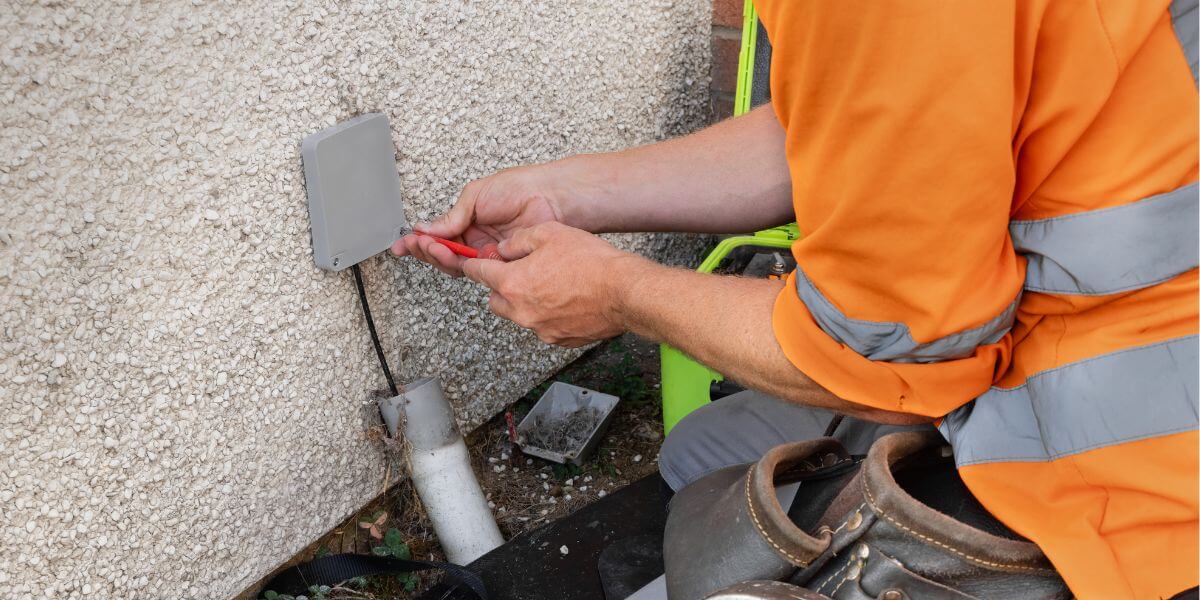
{ "@context": "https://schema.org", "@graph": [ { "@type": "Organization", "@id": "https://compareinternet.com/#organization", "name": "Blog", "logo": { "@type": "ImageObject", "@id": "https://compareinternet.com/#logo", "url": "https://content.isg.us/wp-content/uploads/2023/03/compare-internet-logo-compress.svg", "contentUrl": "https://content.isg.us/wp-content/uploads/2023/03/compare-internet-logo-compress.svg", "caption": "Blog", "inLanguage": "en-US", "width": "144", "height": "63" } }, { "@type": "WebSite", "@id": "https://compareinternet.com/#website", "url": "https://compareinternet.com/", "name": "https://compareinternet.com/", "publisher": { "@id": "https://compareinternet.com/#organization" }, "inLanguage": "en-US" }, { "@type": "ImageObject", "@id": "https://content.isg.us/wp-content/uploads/2026/09/ISG-CompareInternet-Hero-Image-Template-3.jpg", "url": "https://content.isg.us/wp-content/uploads/2026/09/ISG-CompareInternet-Hero-Image-Template-3.jpg", "width": "1200", "height": "750", "caption": "", "inLanguage": "en-US" }, { "@type": "BreadcrumbList", "@id": "https://compareinternet.com/blog/what-is-an-ont/#breadcrumb", "itemListElement": [ { "@type": "ListItem", "position": "1", "item": { "@id": "https://compareinternet.com/", "name": "Home" } }, { "@type": "ListItem", "position": "2", "item": { "@id": "https://compareinternet.com/blog/", "name": "Blog" } }, { "@type": "ListItem", "position": "3", "item": { "@id": "https://compareinternet.com/blog/what-is-an-ont/", "name": "What Is an ONT? Fiber Equipment Explained (and Why You Don’t Need a Modem)" } } ] }, { "@type": "WebPage", "@id": "https://compareinternet.com/blog/what-is-an-ont/#webpage", "url": "https://compareinternet.com/blog/what-is-an-ont/", "name": "DISH vs Cable | Infinity DISH", "datePublished": "2026-09-09T13:13:34+00:00", "dateModified": "2026-09-11T13:58:03+00:00", "isPartOf": { "@id": "https://compareinternet.com//#website" }, "primaryImageOfPage": { "@id": "https://content.isg.us/wp-content/uploads/2026/09/ISG-CompareInternet-Hero-Image-Template-3.jpg" }, "inLanguage": "en-US", "breadcrumb": { "@id": "https://compareinternet.com/blog/what-is-an-ont/#breadcrumb" } }, { "@type": "Person", "@id": "https://compareinternet.com/sam-watanuki/", "name": "Sam Watanuki", "url": "https://compareinternet.com/sam-watanuki/", "image": { "@type": "ImageObject", "@id": "https://content.isg.us/wp-content/uploads/2026/07/Sam-Watanuki.png", "url": "https://content.isg.us/wp-content/uploads/2026/07/Sam-Watanuki.png", "caption": "Sam Watanuki", "inLanguage": "en-US" }, "worksFor": { "@id": "https://compareinternet.com/" } }, { "@type": "BlogPosting", "headline": "What Is an ONT? Fiber Equipment Explained (and Why You Don’t Need a Modem)", "keywords": "what is an ONT", "datePublished": "2026-09-09T13:13:34+00:00", "dateModified": "2026-09-11T13:58:03+00:00", "articleSection": "Blog", "author": { "@id": "https://compareinternet.com/sam-watanuki/", "name": "Sam Watanuki", "url": "https://compareinternet.com/sam-watanuki/" }, "publisher": { "@id": "https://compareinternet.com/#organization" }, "description": "What is an ONT? It's the device fiber internet uses instead of a cable modem, converting light signals into data your router can use.", "name": "What Is an ONT? Fiber Equipment Explained (and Why You Don’t Need a Modem)", "@id": "https://compareinternet.com/#richSnippet", "isPartOf": { "@id": "https://compareinternet.com/#webpage" }, "image": { "@id": "https://content.isg.us/wp-content/uploads/2026/09/ISG-CompareInternet-Hero-Image-Template-3.jpg" }, "inLanguage": "en-US", "mainEntityOfPage": { "@id": "https://compareinternet.com/#webpage" } }, { "@context": "https://schema.org", "@type": "NewsArticle", "articleBody": "<p>An ONT, or optical network terminal, is the small box a <a href="https://www.compareinternet.com/fiber-internet/" target="_blank" rel="noopener">fiber provider</a> installs in your home to convert light signals traveling through the fiber-optic cable into the electrical data your router and devices can actually use [1]. If you’re asking because a technician just left one mounted on your wall, it’s the fiber equivalent of a cable modem, it’s the only piece of fiber internet equipment that talks directly to the provider’s network, and once it’s installed, you don’t need a separate modem at all.</p><p>Fiber has grown from a niche option into the fastest-expanding type of home internet in the country, with more than 60% of U.S. households now able to get it, according to a 2026 Fiber Broadband Association deployment report [2]. That growth can explain why so many people are running into an ONT for the first time.</p><p>[search_block]</p><h2>What Is an ONT, Exactly? (Optical Network Terminal Explained)</h2><p>An optical network terminal sits at the exact point where the fiber-optic line entering your home ends. DSL and <a href="https://www.compareinternet.com/hybrid-fiber-coaxial-internet/" target="_blank" rel="noopener">hybrid fiber coaxial (HFC) internet</a> arrive as an electrical signal over copper wire, which is why a modem’s whole job is decoding that signal. Fiber instead sends data as pulses of light over <a href="https://www.compareinternet.com/blog/how-is-fiber-internet-installed-short-guide/" target="_blank" rel="noopener">hair-thin glass strands</a>, which electronics can’t read directly, so the ONT’s job is to make the conversion: light in, standard Ethernet data out. Some providers call it a “service box” or “fiber jack” instead—it’s the same fiber optic terminal explained under a different name.</p><div id="attachment_12401" style="width: 1210px" class="wp-caption alignnone"><img loading="lazy" decoding="async" aria-describedby="caption-attachment-12401" class="size-full wp-image-12401 cap_c cap_cv c_color_w" src="https://content.isg.us/wp-content/uploads/2026/09/ISG-CompareInternet-In-Article-Image-Template-5.jpg" alt="fiber router on wall" width="1200" height="600" srcset="https://content.isg.us/wp-content/uploads/2026/09/ISG-CompareInternet-In-Article-Image-Template-5.jpg 1200w, https://content.isg.us/wp-content/uploads/2026/09/ISG-CompareInternet-In-Article-Image-Template-5-300x150.jpg 300w, https://content.isg.us/wp-content/uploads/2026/09/ISG-CompareInternet-In-Article-Image-Template-5-1024x512.jpg 1024w, https://content.isg.us/wp-content/uploads/2026/09/ISG-CompareInternet-In-Article-Image-Template-5-768x384.jpg 768w" sizes="auto, (max-width: 1200px) 100vw, 1200px" /><p id="caption-attachment-12401" class="wp-caption-text">What Does the Fiber Box in My House Do?</p></div><p>If you’re wondering what does the fiber box in my house do beyond “convert signals,” it’s the entire boundary between your home network and the provider’s network. A technician mounts it on an exterior wall, in a garage, or in a utility closet, then runs the fiber strand into it and “lights up” the connection from the provider’s side.</p><p>It needs continuous power from a wall outlet—some models include a battery backup so landline service survives an <a href="https://www.compareinternet.com/blog/where-americans-search-for-internet-outage-most/" target="_blank" rel="noopener">outage</a>, but internet access typically goes down with the power unless you have one. A single Ethernet cable then runs from the ONT to your router.</p><h2>ONT vs. Modem: What’s the Difference?</h2><p>The ONT vs modem question comes up constantly with new fiber customers, and the direct answer is that you do not need a modem with fiber internet. Both do the same basic job—translate an incoming ISP signal into something your router can use—over different mediums.</p><p>Modems handle electrical signals over coax or copper, while ONTs handle light over glass fiber. The other difference is ownership. <a href="https://www.compareinternet.com/blog/rent-or-buy-a-router-and-modem/" target="_blank" rel="noopener">Modems are often something you can buy</a> outright, while ONTs are almost always provider-owned equipment tied to the specific fiber line running into your house.</p><div id="attachment_12400" style="width: 1210px" class="wp-caption alignnone"><img loading="lazy" decoding="async" aria-describedby="caption-attachment-12400" class="size-full wp-image-12400 cap_c cap_cv c_color_w" src="https://content.isg.us/wp-content/uploads/2026/09/ISG-CompareInternet-In-Article-Image-Template-2-3.jpg" alt="fiber router on wall" width="1200" height="600" srcset="https://content.isg.us/wp-content/uploads/2026/09/ISG-CompareInternet-In-Article-Image-Template-2-3.jpg 1200w, https://content.isg.us/wp-content/uploads/2026/09/ISG-CompareInternet-In-Article-Image-Template-2-3-300x150.jpg 300w, https://content.isg.us/wp-content/uploads/2026/09/ISG-CompareInternet-In-Article-Image-Template-2-3-1024x512.jpg 1024w, https://content.isg.us/wp-content/uploads/2026/09/ISG-CompareInternet-In-Article-Image-Template-2-3-768x384.jpg 768w" sizes="auto, (max-width: 1200px) 100vw, 1200px" /><p id="caption-attachment-12400" class="wp-caption-text">Do I Need a Router With Fiber?</p></div><p>Yes. An ONT only gets you a working internet connection. It doesn’t create Wi-Fi or manage multiple devices. So if you’re asking “do I need a router with fiber,” the answer is that you still need one, connected to the ONT’s Ethernet port. Some <a href="https://www.compareinternet.com/" target="_blank" rel="noopener">internet providers</a>, notably <a href="https://www.compareinternet.com/reviews/att/" target="_blank" rel="noopener">AT&T</a>, ship a combined gateway that handles both routing and Wi-Fi in one box, and on newer models the ONT itself is now built directly into that gateway rather than existing as a separate unit.</p><h2>What Do the ONT Lights Mean?</h2><p>Most ONTs use two or three labeled indicator lights, and understanding ONT lights’ meaning takes about ten seconds once you know the pattern. AT&T’s official equipment guide, for example, lists a solid green power light and a solid green “PON” light as normal operation, a flashing PON light as the connection still establishing, and any red light as a sign to contact support [3].</p><p>Other providers use nearly identical logic even when the labels differ slightly, where solid green across the board is good, and red or unlit usually means a technician visit is coming.</p><h2>AT&T Fiber ONT vs. Frontier ONT: How Equipment Differs by Provider</h2><p>Not every fiber installation looks the same, which matters if you’re comparing internet providers before signing up. An AT&T Fiber ONT setup varies by gateway model: older BGW210 units use a standalone ONT wired by Ethernet to the router, while newer BGW320 gateways build the ONT directly into the gateway, so there’s no separate box. A <a href="https://www.compareinternet.com/reviews/frontier/" target="_blank" rel="noopener">Frontier</a> ONT, on the other hand, is consistently a standalone unit—mounted in a garage, closet, or exterior enclosure—that <a href="https://www.compareinternet.com/blog/wi-fi-vs-ethernet-showdown-which-is-for-you/" target="_blank" rel="noopener">connects to a router over Ethernet</a> and includes a swappable battery backup for landline service [4]. <a href="https://www.compareinternet.com/reviews/verizon/" target="_blank" rel="noopener">Verizon Fios</a>, <a href="https://www.compareinternet.com/reviews/google-fiber/" target="_blank" rel="noopener">Google Fiber</a>, and most regional fiber providers follow the same standalone-box pattern as Frontier.</p><div id="attachment_12399" style="width: 1210px" class="wp-caption alignnone"><img loading="lazy" decoding="async" aria-describedby="caption-attachment-12399" class="size-full wp-image-12399 cap_c cap_cv c_color_w" src="https://content.isg.us/wp-content/uploads/2026/09/ISG-CompareInternet-In-Article-Image-Template-1-3.jpg" alt="technician installing fiber" width="1200" height="600" srcset="https://content.isg.us/wp-content/uploads/2026/09/ISG-CompareInternet-In-Article-Image-Template-1-3.jpg 1200w, https://content.isg.us/wp-content/uploads/2026/09/ISG-CompareInternet-In-Article-Image-Template-1-3-300x150.jpg 300w, https://content.isg.us/wp-content/uploads/2026/09/ISG-CompareInternet-In-Article-Image-Template-1-3-1024x512.jpg 1024w, https://content.isg.us/wp-content/uploads/2026/09/ISG-CompareInternet-In-Article-Image-Template-1-3-768x384.jpg 768w" sizes="auto, (max-width: 1200px) 100vw, 1200px" /><p id="caption-attachment-12399" class="wp-caption-text">Do I Own My ONT?</p></div><p>No… with rare exceptions, the ONT belongs to the fiber provider, not the customer, even though it lives inside or on your home. Treat it like a rented modem. Don’t unplug the fiber cable, relocate it, or cover its vents.</p><p>Initial ONT installation on a fiber line has to be done by a technician, since the provider must activate, or “light up,” the connection remotely before the box will pass any data. If you cancel service, you’ll typically need to return it.</p><h2>How to Compare Internet Providers When Equipment Is Part of the Decision</h2><p>Equipment policy is easy to overlook, but it’s worth factoring in when you compare internet plans in your area. Some providers roll the ONT and router into a flat equipment fee, others include it free, and a few let you skip their router if you’re comfortable configuring your own. That’s on top of the usual variables—internet prices, contract terms, speed tiers—that make up any real internet comparison.</p><p>Before picking from the best internet providers in your market, a <a href="https://www.compareinternet.com/reviews/compare-internet-providers/" target="_blank" rel="noopener">side-by-side comparison</a> tool for the best internet in your area can find which companies bundle equipment into the advertised price and which add it later.</p><p><strong>Use the zip code tool below to check which fiber providers serve your address.</strong></p><p>[search_block]</p><h2>FAQs</h2><h3>Do I need to buy my own ONT?</h3><p>No. It’s tied to the provider’s fiber network and is installed, owned, and maintained by the ISP — you can’t buy a generic one and swap it in like a cable modem.</p><h3>Can I use my own router with a fiber ONT?</h3><p>Usually, yes — connect your router’s WAN port to the ONT’s Ethernet or data port. Some AT&T setups require the gateway to be in passthrough or bridge mode first if the ONT and router are separate boxes.</p><h3>What does it mean if my ONT light is red or blinking?</h3><p>Red almost always signals a problem between the ONT and the provider’s network, not your router or Wi-Fi. A blinking light during setup is usually normal and should turn solid within a few minutes; if it doesn’t, contact your provider.</p><h3>Does my ONT need a battery backup?</h3><p>Only if you want phone or internet service to stay up during an outage, and only if your provider offers one. Many ONTs, including Frontier’s, ship with a user-replaceable battery, but the connection itself still depends on the ONT having power.</p><h2>Sources</h2><p>[1]<a href="https://www.att.com/support/article-modal/u-verse-high-speed-internet/KM1011652/" target="_blank" rel="noopener"> AT&T. “Equipment we use to provide internet to your home.”</a></p><p>[2]<a href="https://fiberbroadband.org/2026/04/15/u-s-fiber-broadband-total-passings-reach-100m-mark/" target="_blank" rel="noopener"> Fiber Broadband Association. “U.S. Fiber Broadband Total Passings Reach 100M Mark.”</a></p><p>[3]<a href="https://www.att.com/support/article-modal/internet/000099660/" target="_blank" rel="noopener"> AT&T. “Use ONT status lights to troubleshoot internet issues.”</a></p><p>[4]<a href="https://blog.frontier.com/?p=296185" target="_blank" rel="noopener"> Frontier. “What Is An Optical Network Terminal?”</a></p>", "headline": "What Is an ONT? Fiber Equipment Explained (and Why You Don’t Need a Modem)", "articleSection": "Internet", "datePublished": "2026-09-09T13:13:34+00:00", "dateModified": "2026-09-11T13:58:03+00:00", "publisher": [{ "@type": "Organization", "name": "Compare Internet", "logo": { "@type": "ImageObject", "url": "https://www.compareinternet.com/wp-content/uploads/2023/02/Compare-Internet-white.png", "width": 1350, "height": 360 }, "alternateName": "Compare Internet" }], "author": [{ "@type": "Person", "name": "Sam Watanuki", "url": "https://compareinternet.com/authors/sam-watanuki/", "jobTitle": "Sam Watanuki", "image": { "@type": "ImageObject", "url": "https://content.isg.us/wp-content/uploads/2026/07/Sam-Watanuki.png", "height": 337, "width": 337 } }], "image": [{ "@type": "ImageObject", "url": "https://content.isg.us/wp-content/uploads/2026/09/ISG-CompareInternet-Hero-Image-Template-3.jpg", "height": 1200, "width": 750 }], "description": "What Is an ONT? Fiber Equipment Explained (and Why You Don’t Need a Modem)", "wordCount": "1842", "mainEntityOfPage": "https://compareinternet.com/blog/what-is-an-ont/" } ] }
Use code: KALA & receive a $50 gift card with your order!